Klaviyo SMS Assistant
Site: https://www.klaviyo.com/blog/sms-assistant
Aucun plan tarifaire detaille n'est encore disponible pour cet outil.
Write SMS campaigns in seconds with Klaviyo’s new AI-powered SMS Assistant Rob Hand5 min read Klaviyo news November 4, 2022 Copy as Markdown Klaviyo customers use campaigns to send one-time messages to pre-established target audiences — think regular newsletters, sale announcements, or promotional sends — using either email or SMS. With Klaviyo’s new, first of its kind, AI-powered SMS Assistant, marketers can now plug-in a few descriptions about their SMS campaign to generate examples of compliant SMS copy in just a matter of seconds. For example, you know you want to drop a new product for Mother’s day but aren’t sure what to say. Just enter “Mother’s Day”, product drop, and a few words about the product. In seconds, you’ll be able to shuffle through multiple options of recommended copy for inspiration and customize any of the examples to match your brand voice. The challengeNew channel, new challengesCopywriting is hard. Creating succinct messaging that informs and delights subscribers enough to drive them to purchase, takes a lot of practice and experience to get right. Tailoring your messaging to the specific channel it’s being delivered on can also be challenging, and no other channel requires makreters to be more succinct in their copywriting than SMS marketing.Text message marketing is new for most brands and marketers today. As a brand new marketing channel, it’s difficult to find and learn the best practices for sending compelling text messages that also meet the ever changing compliance requirements of mobile carriers. With this feedback from our customers, the Klaviyo team set out to create a tool that uses machine learning to make text message copywriting easier.The solutionAI-powered SMS copywritingKlaviyo’s SMS Assistant is the first SMS tool to automate copywriting for text campaigns, one of the most time consuming and difficult steps in the creative process. The SMS Assistant is also trained to be compliant with mobile carrier regulations and avoid sending any forbidden SMS content. This SMS Assistant is the perfect tool for marketers who are considering SMS for the first time. It eliminates the content creation learning curve for this new channel, while providing confidence that your messages will meet compliance regulations. Even for those more experienced with SMS marketing, this tool will cut down the time it takes to write content and can provide new inspiration in your text message creation.Getting startedTo access the SMS Assistant click the purple lightbulb icon in the right hand corner of the SMS campaign editor. The first step in using the assistant is to select a campaign type. You’ll have 4 campaign types to choose from: PromotionProduct AnnouncementNewsletterOtherBased on your selection, the SMS Assistant will generate content using verbiage to match. For example, selecting “Promotion” will generate content related to urgency and sales.After you select a campaign type, it’s time to input information about your campaign. This will include the name of the product (optional) and then a brief description of the campaign. It’s important to note that the more information you can provide, the more relevant the generated campaigns will be.Once you’ve added information regarding the campaign, simply click “Get Ideas” and the SMS Assistant will generate 3 messages based on your inputs. In most cases, the SMS assistant will provide two shorter messages utilizing 1 SMS to send, and one longer message that will utilize 2 SMS to send. If you’ve found an SMS message you’d like to use, simply click on the text box of the message to populate it into the SMS editor. Doing so will append the selected message to any existing text you may already have in the editor, rather than replacing it completely.If you wish to see more SMS ideas, you can click the “Get More Ideas” button to display a new set of SMS messages. Warning: clicking the “Get More Ideas” button will clear and completely replace the set of generated messages that are currently displayed. If you like any of the generated messages, it’s best to click on the suggested message text box to add it to your message editor before continuing to generate new messages. Try the SMS Assistant in your next SMS campaign and get inspired! Rob HandRob has been at Klaviyo for over 4 years where he’s grown into several roles including Principal Customer Success Manager, helping customers strategically grow their business. He discovered his passion for SMS marketing and has since joined the Marketing team as the Product Marketing Manager for SMS. In his free time, Rob is a cyclist and runner. Related contentReadKlaviyo newsMar 26, 2026Klaviyo Named a Strong Performer in Forrester Email WaveKlaviyo earned above-average customer scores in the Forrester Wave for email marketing. See how we ranked among the top 12 providers.ReadKlaviyo newsMar 24, 2026Klaviyo just shipped its biggest AI release yetExplore the latest new Klaviyo AI features, including Composer for campaign generation from prompts, Customer Agent for automated support, RCS messaging, and personalized send time optimization.ReadKlaviyo newsMar 9, 2026Locale aware catalogs: sync Shopify Markets with KlaviyoSync localized product catalogs from Shopify Markets into Klaviyo to deliver accurate pricing, language, and products for every customer in every region. # Write SMS campaigns in seconds with Klaviyo’s new AI-powered SMS Assistant Klaviyo customers use campaigns to send one-time messages to [pre-established target audiences ](https://www.klaviyo.com/features/segmentation)— think regular newsletters, sale announcements, or promotional sends — using either email or [SMS](https://www.klaviyo.com/sms-marketing). With Klaviyo’s new, first of its kind, AI-powered SMS Assistant, marketers can now plug-in a few descriptions about their SMS campaign to generate examples of compliant SMS copy in just a matter of seconds. For example, you know you want to drop a new product for Mother’s day but aren’t sure what to say. Just enter “Mother’s Day”, product drop, and a few words about the product. In seconds, you’ll be able to shuffle through multiple options of recommended copy for inspiration and customize any of the examples to match your brand voice. **The challenge** ## **New channel, new challenges** Copywriting is hard. Creating succinct messaging that informs and delights subscribers enough to drive them to purchase, takes a lot of practice and experience to get right. Tailoring your messaging to the specific channel it’s being delivered on can also be challenging, and no other channel requires makreters to be more succinct in their copywriting than SMS marketing. [Text message marketing](https://www.klaviyo.com/sms-marketing) is new for most brands and marketers today. As a brand new marketing channel, it’s difficult to find and learn the best practices for sending compelling text messages that also meet the ever changing compliance requirements of mobile carriers. With this feedback from our customers, the Klaviyo team set out to create a tool that uses machine learning to make text message copywriting easier. **The solution** ## **AI-powered SMS copywriting** Klaviyo’s SMS Assistant is the first SMS tool to automate copywriting for text campaigns, one of the most time consuming and difficult steps in the creative process. The SMS Assistant is also trained to be compliant with mobile carrier regulations and [avoid sending any forbidden SMS content](https://www.klaviyo.com/product/whats-new/sms-disclosure-block). This SMS Assistant is the perfect tool for marketers who are considering SMS for the first time. It eliminates the content creation learning curve for this new channel, while providing confidence that your messages will meet compliance regulations. Even for those more experienced with SMS marketing, this tool will cut down the time it takes to write content and can provide new inspiration in your text message creation. ### **Getting started** To access the SMS Assistant click the purple lightbulb icon in the right hand corner of the SMS campaign editor. The first step in using the assistant is to select a campaign type. You’ll have 4 campaign types to choose from: 1. Promotion 2. Product Announcement 3. Newsletter 4. Other Based on your selection, the SMS Assistant will generate content using verbiage to match. For example, selecting “Promotion” will generate content related to urgency and sales. 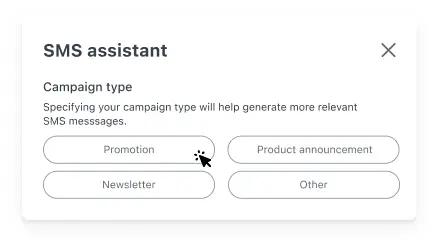 After you select a campaign type, it’s time to input information about your campaign. This will include the name of the product (optional) and then a brief description of the campaign. It’s important to note that the more information you can provide, the more relevant the generated campaigns will be. 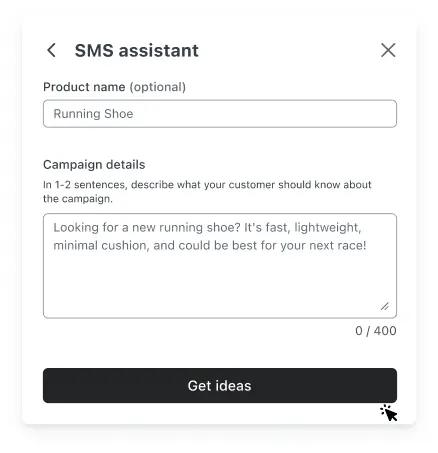 Once you’ve added information regarding the campaign, simply click “Get Ideas” and the SMS Assistant will generate 3 messages based on your inputs. In most cases, the [SMS assistant](https://www.klaviyo.com/product/whats-new/two-way-sms-uk-aus) will provide two shorter messages utilizing 1 SMS to send, and one longer message that will utilize 2 SMS to send. If you’ve found an SMS message you’d like to use, simply click on the text box of the message to populate it into the SMS editor. Doing so will append the selected message to any existing text you may already have in the editor, rather than replacing it completely. 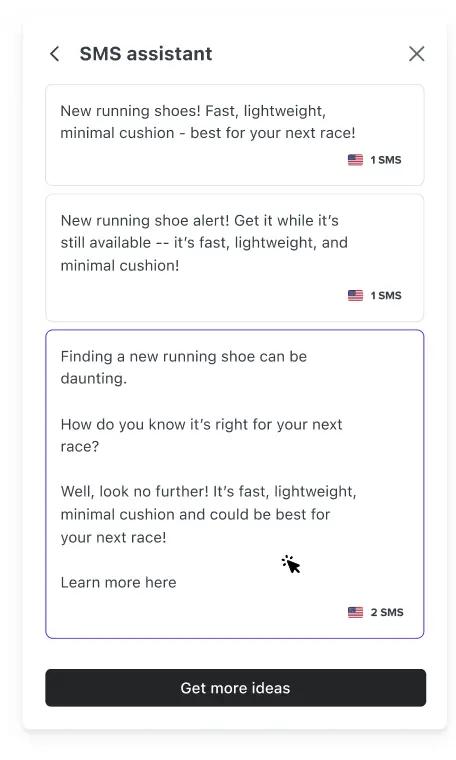 If you wish to see more [SMS ideas](https://www.klaviyo.com/product/whats-new/ai-suggested-responses), you can click the “Get More Ideas” button to display a new set of SMS messages. Warning: clicking the “Get More Ideas” button will clear and completely replace the set of generated messages that are currently displayed. If you like any of the generated messages, it’s best to click on the suggested message text box to add it to your message editor before continuing to generate new messages. Try the [SMS Assistant](https://help.klaviyo.com/hc/en-us/articles/10039353259163) in your next SMS campaign and get inspired! --- Klaviyo pricing: Start with a free planExplore Klaviyo's free plan—get started at no cost with email marketing sends, text message credits, Customer Hub, and built-in reporting.FreeMarketingData + AnalyticsService (30% OFF)Professional ServicesEnterprisePlatformTotal: $0USDView breakdownFree plan highlightsUp to 250 profiles500 emails/month150 mobile message creditsCustomer HubBuilt-in reportingEmail supportGet to know the Klaviyo platformExplore our free products and features across marketing, service, analytics, and support.MarketingUp to 500 email sends per month150 monthly mobile message creditsBasic email templates and drag-and-drop editorAI-powered subject line generatorMarketing Agent for campaign creationMobile app marketingAnalytics + DataBuilt-in reporting and dashboardsEmail campaign performance metricsBasic customer segmentationContact and list growth trackingRevenue attribution for campaignsEngagement and click-through ratesServiceCustomer HubBasic self-service portalAccount managementOrder tracking and status updates1-click "Buy again"HelpdeskBasic ticket managementPersonalized macrosSupports multiple agentsShared email inboxSupportEmail support for first 60 daysKlaviyo Academy coursesKlaviyo CommunityHelp Center and documentationGetting started guides and tutorialsProduct updates and release notesStart freeBuild a planStart growing your businessGet started with essential marketing tools at no cost. Perfect for small businesses and startups.Start freeUp to 250 active profiles500 email sends/month150 mobile message credits/monthFrequently asked questionsWhat is included in the Klaviyo free plan?The free plan allows you to create a Klaviyo account, import or sync your contacts and activity data, use the drag-and-drop email / SMS editors, and build automations, segmentation, and reports. On this tier you are limited to up to 250 active profiles (contacts who may receive marketing emails) and 500 email sends per month. Additionally, the free tier includes 150 mobile messaging credits per month (region/carrier dependent).Is Klaviyo's free plan really free?Yes — the free plan is available at no monthly cost as long as your account remains under the limits of 250 active profiles and 500 monthly email sends. However if you exceed those limits (or require paid-plan features such as custom branding removal or advanced support) you will need to upgrade or your sending may be paused.How long can I stay on the free plan?You may remain on the free plan indefinitely as long as your active profile count remains at or below the 250-profile limit and your monthly sends stay at or below 500 emails. Once you exceed either threshold, your ability to send may be restricted. Note: With the free plan you receive full email support only for the first 60 days; after that you still have access to the Help Center, community resources, and training but not full support channels reserved for paid tiers.Who is the Klaviyo free plan best for?The free plan is best suited for small businesses, start-ups, or brands just getting started with marketing automation who have relatively small contact lists (≤250 active profiles) and moderate sending needs (≤500 emails/month). It allows you to test Klaviyo's platform, integrate your data, run automations, and experiment with segmentation and SMS (via credits) without paying upfront. As your audience, sends or sophistication grow, you'll likely need to transition to a paid tier.Can I use Klaviyo free plan for both email and SMS marketing?Yes — the free plan supports both email marketing and text (SMS/MMS) marketing to a degree. On the free plan you are allotted 150 mobile messaging credits per month, so you can test mobile messaging campaigns.Does the free plan include SMS or text message marketing?Yes — the free plan includes 150 mobile messaging credits per month, enabling you to send mobile messages in addition to email.What integrations are available on the free plan?The free plan supports the standard library of integrations (for example ecommerce platforms, CRMs, web forms, data sources) that Klaviyo offers. You are not blocked from connecting your tech stack just because you're on the free tier. Many third-party reviewers note that Klaviyo's core integrations are included.What happens when I exceed the free plan limits?Once you exceed the free plan's limits (e.g., more than 250 active profiles or more than 500 email sends in a month), your account will no longer be able to send additional emails or messages until the next billing cycle or until you upgrade to a paid plan. You'll be prompted to upgrade to continue sending.Does the free plan include customer support?Yes, but with limitations: free plan users receive email support for the first 60 days after sign-up. After that, you'll have access to the Klaviyo Community and self-service resources (Help Center, Academy) rather than full support channels reserved for paid tiers.Is Klaviyo free plan good for ecommerce stores on Shopify, Wix, or WooCommerce?Yes — the free plan can absolutely work for ecommerce stores (on Shopify, WooCommerce, Wix etc) that are just starting out, testing email + SMS, or sending to smaller audiences. Because Klaviyo supports integrations with major ecommerce platforms and gives you access to segmentation and automation even on free, it's a useful entry point. As your store and list grow (beyond the 250 contact limit or high-volume sends), you'll want to move to a paid tier.How do I upgrade from Klaviyo free to a paid plan?Upgrading from the free plan is straightforward: in your Klaviyo account head to Account Settings → Billing (or Change Plan), review your active profile count and required sends, select the paid tier that matches your needs, and complete the upgrade. Once upgraded, your account unlocks paid-plan features (no send or profile limits on that tier), plus enhanced support, branding removal, etc. --- About KlaviyoThe B2C CRMKlaviyo is the AI-first CRM built for B2C brands. Powered by its built-in data platform and AI insights, Klaviyo combines marketing automation, analytics, and customer service into one unified solution, making it easy for businesses to know their customers and grow faster.How it startedBuilt to solve the customer data problemIn 2012, Klaviyo co-founders Andrew Bialecki and Ed Hallen saw a frustrating pattern: consumer brands were sitting on mountains of data but couldn’t use it to personalize experiences or drive revenue.The tech to unite data, analytics, and marketing didn’t exist. So they built it.Today, 193,000+ brands worldwide use Klaviyo not just to sell but to create lifelong customer relationships.“At Klaviyo, we’ve always believed that building customer relationships starts with your data—and it shouldn’t be complicated. We help businesses of all sizes unlock the full potential of their data to build lifelong relationships and grow smarter, faster, and without compromise. That’s the power of customer-first data.”—Andrew Bialecki, Klaviyo co-founder and CEOHow Klaviyo has evolvedA data-first platform from day one. Now a unified B2C CRM.2012: Klaviyo is founded as a customer database.2013: Email marketing launches.2018: Marketing attribution and optimization launches.2021: SMS marketing launches. 7.5 billion emails sent during BFCM.2023: Reviews launches.2023: CDP launches.2025: B2C CRM launches: unifying data, marketing, service, and analytics.193,000+paying customers in 80+ countries2,000+Klaviyos worldwide2+ billiondaily events processed7+ billioncustomer profiles managedAndrew BialeckiCo-founder and co-CEOChano FernandezCo-CEOEd HallenCo-founder and chief strategy officerSurabhi GuptaChief technology officerLandon EdmondChief legal officerAmanda WhalenChief financial officerJamie DomeniciChief marketing officerEmily McEvillyChief customer officerEric FeardayChief revenue officerCarmel GalvinChief people officerOfficesBoston (Global Headquarters)125 Summer Street, Floor 6Boston, MA 02111Denver1200 17th Street, Floor 25Denver, CO 80202San Francisco181 Fremont Street, Floor 21San Francisco, CA 94105London5th Floor, 106 Fenchurch StreetLondon EC3M 5JDUnited KingdomDublinWeWork, One Central Plaza, Dame StreetDublin 2, D02 A4W7IrelandSydneyLevel 17, 420 George StreetSydney NSW 2000AustraliaWhat’s with the name?Klaviyo (clay-vee-oh) is inspired by clavija, a Spanish word for mountaineering pins—also called pitons. These pitons support climbers as they ascend, and catch them if they fall.We liken our customers to mountaineers. Our goal is to support and accelerate their climb to the summit. --- klaviyo Platform FeaturesFeatures made for making every customer interaction countGet game-changing data and AI marketing tools that make building smarter relationships easy.Sign upView pricingActivatePersonalize with better dataCentralize your customer data, capture every detail, and get to know your customers like never before.Customer profilesGet a full view of each customer’s behavior across channels, use AI to predict what they’ll do next, and create tailor-made buying experiences.Explore profilesSegmentationTarget exactly the right customers with custom segments based on hundreds of data points. Segment AI creates complex segments from simple prompts.Explore segmentationIntegrations & APIsConsolidate all your customer data into one place with 350+ pre-built integrations and APIs—and find out how easy personalizing interactions can be.Explore integrations and APIsConnectDrive engagement and revenueMake the most of every customer interaction across email, SMS, web forms, mobile push notifications, reviews, and more.Automated flowsCreate customized email, SMS, and push flows triggered by customer actions. It’s easy, with pre-built templates, a drag-and-drop builder, and Flows AI.Explore flowsOmnichannel campaignsAI and smart segmentation make it easy to tailor every SMS, email, and push campaign to the right audience at the right time.Explore campaignsWeb formsPop-ups, fly-outs, embedded forms, multi-step forms—find the right web form to grow your audience, capture leads, and collect the data you need.Explore web formsGuideTurn data into insightsBetter data means better decisions. Gain new insights and guide your marketing with AI, predictive analytics, and benchmarks.Klaviyo AIKlaviyo AI puts powerful insights at your fingertips—insights like predictive analytics, personalized product recommendations, and more.Explore Klaviyo AI ReportingComprehensive reporting across email, SMS, and mobile push data helps you identify your winning messaging and understand customer behavior.Explore reportingBenchmarks Compare your performance to 100 of your closest peer brands, gaining insights into metrics such as conversion rate and abandoned cart recovery.Explore benchmarks Product analysis Discover how and when products in your catalog are driving orders, so you can upsell and recommend products at the perfect point in the customer journey.Explore product analysisRFM analysis Group and analyze customer profiles based on order recency, frequency, and monetary value, and find more ways to make more sales.Explore RFM analysisPredictive analytics Know what your customers will do next. Predict their next order date, lifetime value, spending potential, time between orders, churn risk, and more.Explore Klaviyo AIPortfolio Analyze performance across your brands, accounts, and regions, and streamline account management into one place.Explore portfolioLoad moreAll new features. All the time.Klaviyo keeps getting more powerful. Check out all our latest features for building smarter digital relationships.See what’s new